
Geology#
geology loads geological zones as vector or raster data. HydroModPy can use
those zones as display layers, mesh constraints, field supports, and keys for
hydraulic-property transfer.
Accepted sources#
Source |
Use when |
Source page |
|---|---|---|
|
A local geology layer and code field are authoritative. |
|
|
The public 1:1,000,000 BRGM geology layer is the intended regional support. |
|
|
The public 1:50,000 BRGM geology layer is available and the study needs finer geological structure. |
|
Minimal example#
[data]
types = ["geology"]

[[data.geology.sources]]
source = "brgm_1m"
extent = "watershed"
Loaded shape#
The loaded object should preserve zone geometries and a stable geology code.
When values_table_path is provided, the code also becomes the join key for
hydraulic-property tables.
Visual check#

Property transfer check#
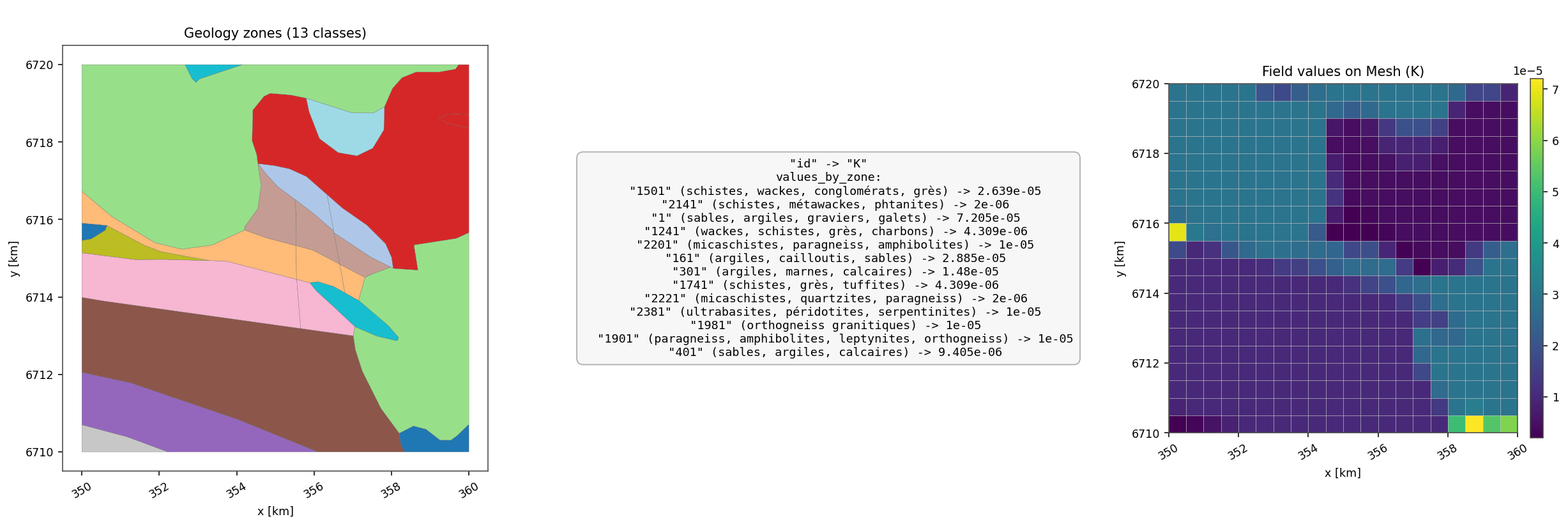
Fig. 142 This generated data-doc case starts from a versioned BRGM-style geology
vector, joins a local property table, rasterizes the geology support on a
mesh, and displays the resulting K field. It is the most direct
documentation proof that geology can become a solver-facing parameter
support instead of remaining a background map.#

Downstream uses#
geology maps in data overviews;
mesh constraints and interfaces;
support selection for fields;
hydraulic conductivity, storage, or zone-based parameterization.
Geology Source: brgm_1m#
Use source = "brgm_1m" for a public regional geology support. It is a good
default when the model needs broad geological differentiation without the
complexity of a finer map.
Minimal example#
[[data.geology.sources]]
source = "brgm_1m"
extent = "watershed"
Operational checks#
The selected
extentshould cover the future mesh or property support.The clipped layer should keep readable categories and a usable legend.
If properties are transferred from geology, verify the resulting parameter map rather than assuming every BRGM code has a property.
Expected figure#
Use the geology overview panel first, then the geology-driven conductivity transfer figure when the layer feeds hydraulic parameters.
Geology Source: brgm_50k#
Use source = "brgm_50k" when the available public 1:50,000 geology layer
is appropriate for the study scale and the project benefits from finer
geological detail.
Minimal example#
[[data.geology.sources]]
source = "brgm_50k"
extent = "study_area"
Operational checks#
Finer geology can introduce many small interfaces. Check mesh size and interface count before activating every boundary as a constraint.
The legend should remain readable after clipping.
Property-table coverage is more important at fine scale because missing categories can become spatially fragmented.
Expected figure#
Use a map panel to inspect categories, then a mesh or property-transfer figure to decide whether the detail is useful or too noisy for the model objective.
Geology Source: custom#
Use source = "custom" when a local geology vector or raster is the
reference for the project.
Minimal example#
[[data.geology.sources]]
source = "custom"
path = "data/geology/geology.gpkg"
code_field = "CODE_LEG"
values_table_path = "data/geology/hydraulic_properties.csv"
Operational checks#
code_fieldmust exist in the local layer and remain non-empty after clipping.values_table_pathshould use the same geology codes when properties are joined.CRS and geometry validity matter because geology can constrain meshes.
Empty or unlabeled legend categories usually mean the code field or property join is wrong.
Expected figure#
Inspect the geology panel with its legend, then inspect any derived hydraulic-property transfer figure before trusting the layer in a model.