
Worked MODFLOW Case: Nancon Transient NWT With ETP To EVT#
Purpose#
This page is the first real-basin MODFLOW-NWT worked case in the scientific documentation.
Its role is narrower than a full basin tutorial:
show one public HydroModPy TOML that activates
MODFLOW-NWT,explain how
data.etpbecomes a runtimeETPforcing,show how HydroModPy feeds both
RCHandEVTon the same run,and state clearly which figures and outputs should be inspected after execution.
Why This Case#
The case is based on the public example project
examples/projects/02_nancon_watershed.
It is worth documenting because it exercises a part of the public MODFLOW-NWT contract that is more specific than the analytical benchmarks:
real watershed geometry,
real climate-like forcing inputs,
transient monthly periods,
rechargeand explicitetpboth active,top drainage through
DRN,structured
DISplus legacyNWT/UPW/EVTassembly.
This makes it the clearest current worked case for the question:
“On a real HydroModPy basin, how does
ETPactually reachModflowEvt(...)?”
Files Used#
Base project:
examples/projects/02_nancon_watershed/project.tomlRun overlay:
examples/projects/02_nancon_watershed/run_transient_nwt.tomlExample notes:
examples/projects/02_nancon_watershed/README.mdBasin context figures: Nancon Observation Identity Card
Committed basin-result page: Nancon Transient NWT Basin Diagnostics
Basin Context And Committed Result Page#
The basin context and one stable basin-result page are now both committed in the documentation:
basin and forcing context through Nancon Observation Identity Card
stable post-run diagnostics through Nancon Transient NWT Basin Diagnostics
This scientific page still keeps the focus on the package path and option rationale, not on repeating the gallery reading order.


Minimal TOML Reading#
The run is split between a shared project TOML and a lighter overlay.
Run overlay#
base_config = "project.toml"
[workflow]
mode = "simulation"

[simulation]
name = "nancon_transient_nwt"

[simulation.time]
start_datetime = "2000-01-01"
end_datetime = "2002-12-31"
step_value = "1 month"

[[simulation.process]]
id = "flow_main"
type = "flow"
solvers = ["modflow_nwt"]
The overlay keeps the run definition short:
one monthly transient window over three years,
one flow process,
solved by
modflow_nwt.
One Important Runtime Detail#
The public TOML a user reads is not yet the exact solver payload.
HydroModPy first builds a process-level Flow object, then injects the
loaded recharge and ETP data into typed runtime structures:
apply_recharge_load_result_to_flow(...)inhydromodpy/physics/flow/structure_binders.pyapply_etp_load_result_to_flow(...)in the same moduleFlow.set_recharge(...)andFlow.set_etp(...)inhydromodpy/physics/flow/flow.py
That means the visible TOML intent:
[data.etp]declares the source,flow.active_sinks_sources = ["recharge", "etp"]activates the category,
and the runtime object then carries:
flow.sinks_sources["recharge"]as one typedFlowRechargeConfig,flow.sinks_sources["etp"]as one typedFlowEtpConfig.
This distinction matters because the MODFLOW-NWT adapter only reads the
runtime Flow object, not the raw TOML directly.
How HydroModPy Builds RCH And EVT On This Case#
The NWT adapter path is concentrated in
hydromodpy/solver/modflow_nwt/modflow/flow_to_modflow_adapter.py.
The sequence is:
_build_recharge_payload()readsflow.sinks_sources["recharge"], converts units to SIm/s, applies thefirst_climpolicy, and prepares theRCHpayload._build_etp_payload()readsflow.sinks_sources["etp"], clips ETP to non-negative values, and prepares theEVTrate payload._merge_evt_payloads(...)sums the EVT contribution from explicit ETP with any fallback EVT contribution coming from negative recharge.build()returns oneFlowModflowInputsobject containing:rch_dataevt_spdevt_surface_offsetevt_extinction_depth
Modflow.pre_processing(...)inhydromodpy/solver/modflow_nwt/modflow/nwt_solver.pyconverts those SI rates to solver time units and assembles:flopy.modflow.ModflowRch(self.mf, rech=rch_data_solver)flopy.modflow.ModflowEvt(...)whenevt_spd_solveris notNone
The exact EVT call is scientifically important. HydroModPy currently uses:
evtr = evt_spd_solversurf = self.top_elevation - surf_offsetexdp = evt_extinction_depthnevtop = modflownwt.runtime.evt.nevtopievt = modflownwt.runtime.evt.ievtipakcb = modflownwt.runtime.evt.ipakcb
So the public project choice is:
one explicit ETP rate forcing,
one extraction surface below topography,
one extinction depth,
one compact set of NWT EVT controls.
Why These Choices Are Reasonable#
For this real-basin public path, HydroModPy keeps the EVT contract compact on purpose.
active_sinks_sources = ["recharge", "etp"]makes the forcing split explicit at process level.ETPis handled as a dedicated outflow forcing, rather than hiding it inside a negative recharge series.surf = top - surface_offsetkeeps the land-surface interpretation easy to explain.exdpis exposed as one depth parameter instead of opening the whole legacy EVT option surface.DRNremains the top drainage package, so the run separates two ideas:atmospheric extraction through
EVT,head-dependent seepage release through
DRN.
Package Assembly On This Case#
For the documented Nancon NWT run, the public package reading is:
DIS: structured space/time support with monthly stress periodsBAS: startup heads and active-cell maskNWT: nonlinear solve for the transient unconfined runUPW:K,Sy,Ss, and vertical conductivity controlRCH: diffuse rechargeEVT: dedicated ETP forcingDRN: top drainage / seepage releaseOC: systematic head and budget outputs
What this case does not primarily document:
irregular MF6
DISV,XT3D,
CHDstage-style boundaries,wells,
particle tracking or transport.
What To Inspect After Running It#
The project TOML already declares a useful default figure suite:
piezometric_mapwater_budgethydrographrecharge_mapseepage_map
After:
hmp run examples/projects/02_nancon_watershed/run_transient_nwt.toml
the first outputs to inspect are:
figures/nancon_transient_nwt/piezometric_map.*figures/nancon_transient_nwt/water_budget.*figures/nancon_transient_nwt/hydrograph.*figures/nancon_transient_nwt/recharge_map.*figures/nancon_transient_nwt/seepage_map.*
Read them in that order:
piezometric_mapfor the groundwater state,water_budgetfor mass-balance coherence,hydrographfor the outlet response,recharge_mapfor forcing context,seepage_mapfor the drainage response on the basin support.
Committed Simulation Results#
The stable gallery case publishes the most useful result figures for this run. They are repeated here because this page explains the package path that produced them.


How To Make EVT Matter In The Docs#
If the goal is to document the effect of activating EVT, this single
worked case is not enough by itself.
The right documentation object is a small sensitivity family built on the same Nancon basin:
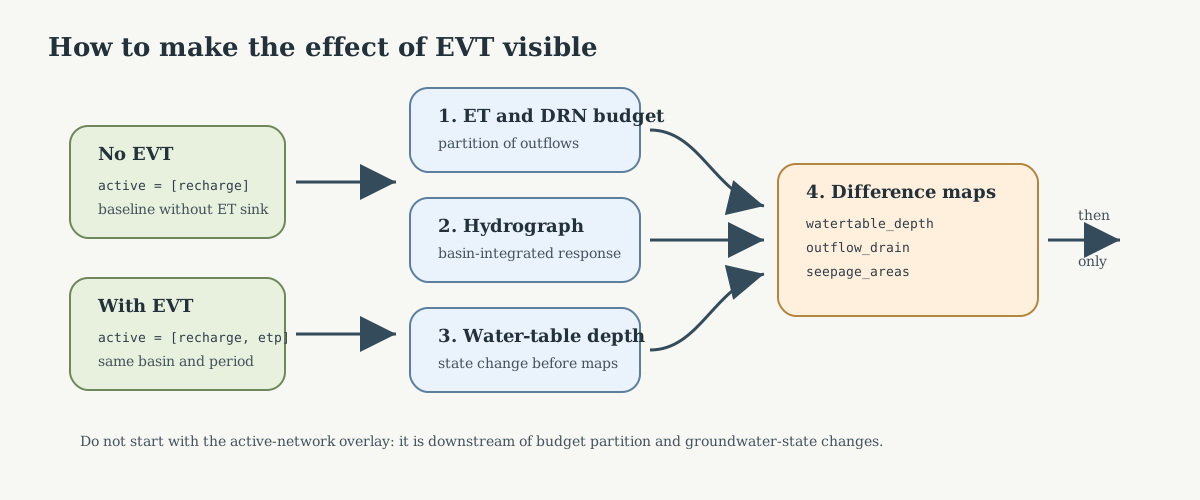
Fig. 68 The comparison should first isolate the hydrological mechanism: ET and DRN budgets, outlet hydrograph, and water-table depth. Spatial overlays are useful only after those primary diagnostics explain what changed.#
one run without explicit
etpactivation,one baseline run with
active_sinks_sources = ["recharge", "etp"],one or two additional runs changing
surface_offsetandextinction_depth.
In other words, the first contrast should be:
No EVT:
flow.active_sinks_sources = ["recharge"]Baseline EVT:
flow.active_sinks_sources = ["recharge", "etp"]
Only after that should the docs add one second layer such as:
[flow.sinks_sources.etp]
surface_offset = 0.5
extinction_depth = 0.5
versus:
[flow.sinks_sources.etp]
surface_offset = 2.0
extinction_depth = 3.0
The outputs that should carry that comparison are, in order:
run.budget(component="et")andrun.budget(component="drains")run.timeseries("discharge", station="_catchment")run.catchment_mean("watertable_depth")timestep maps of
watertable_depth,outflow_drain, andseepage_areasonly then the hydrographic overlay figures and active-network metrics
That ordering is important. If the comparison starts directly with one map overlay, the documentation will hide the real hydrological question, which is first the partition between:
atmospheric extraction through
EVT,head-dependent release through
DRN,and the resulting outlet discharge response.
Why This Page Still Matters Beyond The Committed Gallery Page#
The analytical worked cases are better for exact validation metrics.
This page answers a different need:
how a public HydroModPy basin example is really wired,
how
data.etpreachesModflowEvt(...),how
RCHandEVTcoexist in the NWT branch,and which outputs a contributor should inspect first after a real run.
In other words, it is a workflow-reading page more than a gallery-reading page.
Recommended Reading Order#
Current Scope Boundary#
The committed gallery page for this exact run now exists:
So the split is now deliberate:
this scientific page gives the basin context, exact package path, runtime interpretation, and expected output files,
the gallery page gives the stable rendered figures and their reading order.
What still remains outside this page is a broader Nancon postprocess family of MF6-style bundle figures such as one compact flow-state triptych or support overview. The current committed Nancon gallery case emphasizes hydrographic and active-network diagnostics instead.